对比一下在Java 与C++ 中的实现细节
Java 中使用RandomAccessFile 实现文件随机IO
package com.xum.e003.JavaFile;

import java.io.File;
import java.io.IOException;
import java.io.RandomAccessFile;

import com.google.common.io.Files;

public class FileExample
{
    private static final String FILE_NAME = "test.bin";

    public static void main(String[] args) throws IOException
    {
        File file = new File("./" + FILE_NAME);
        // 如果文件不存在,则创建文件
        if (!file.exists()) {
            Files.touch(file);
        }

        RandomAccessFile randomAccessFile = new RandomAccessFile(file, "rw");

        // 设置文件大小
        randomAccessFile.setLength(8);

        // 写入内容
        randomAccessFile.writeInt(10);
        System.out.println("写入整数:10");
        randomAccessFile.writeInt(20);
        System.out.println("再写入整数:20");

        // seek() 方法将文件指针偏移量,从这个文件开始测量,进行下一个读或写操作
        // 偏移量可以被设置为超出文件的末尾。设置偏移超出了文件的末尾不会改变文件长度
        // 文件长度,也只是由偏移已被设置为超出文件的末尾之后写入更改

        // 定位到第4个字节(从0开始)
        randomAccessFile.seek(4);

        // 读取内容,因为最开始分别写入10(0-3字节)、20(4-7字节),上面seek(4),再readInt,所以预期会读到20
        Integer i = randomAccessFile.readInt();
        System.out.println("读取到整数:" + i);

        // 关闭文件
        randomAccessFile.close();
    }
}
运行效果如下

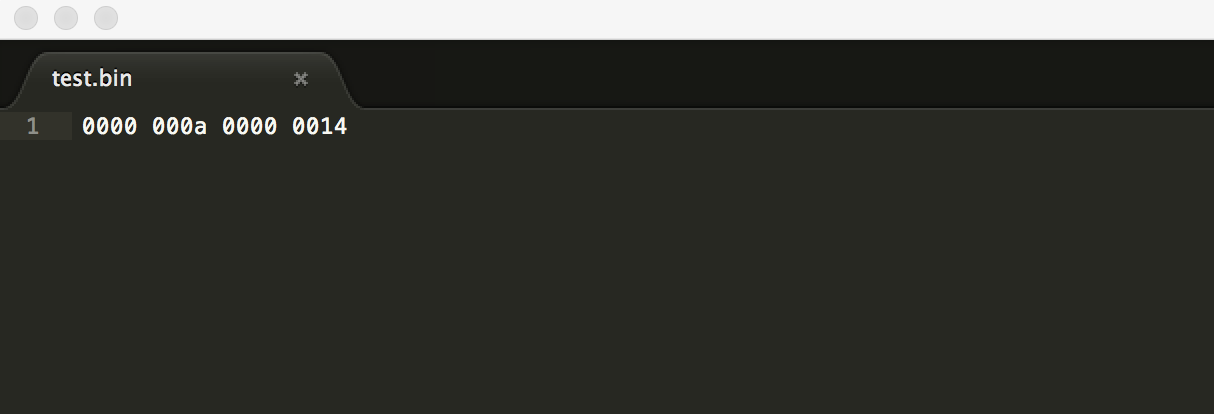
在test.bin 中可以看到二进制内容如下,刚好是10(十六进制A)和20(十六进制14)
C++ 中使用fstream 实现文件随机IO
随机访问文件,即可以任意地向前或向后移动文件指针,具体使用的函数是seekp() 和seekg()。seekp() 即seek put,用于输出流;seekg() 即seek get,用于输入流
可以使用tellp() 和tellg() 函数返回文件指针的当前位置
比如一些典型的用法
- seekg(100, ios::beg) 将文件指针移动到从文件开始第100 个字节处
- seekg(-100, ios::end) 将文件指针移动到从文件末尾向后第100 个字节处
- seekp(42, ios::cur) 将文件指针从当前位置向前移动42 个字节
- seekp(-42, ios::cur) 将文件指针从当前位置向后移动42 个字节
- seekp(100) 将文件指针移动到文件第100 个字节处
看一个具体的例子
#include <iostream>
#include <fstream>

using namespace std;

class Person
{
    public:
        Person() {}
        Person(int age, char sex)
        {
            this->age = age;
            this->sex = sex;
        }

        int getAge() const
        {
            return this->age;
        }

        char getSex() const
        {
            return this->sex;
        }

    private:
        int age;
        char sex;
};

int main()
{
    fstream fs;

    // 写方式打开文件
    fs.open("data.dat", ios::out | ios::binary);

    Person p1(10, 'm');
    Person p2(11, 'f');
    Person p3(12, 'm');

    fs.write(reinterpret_cast<char*>(&p1), sizeof(Person));
    fs.write(reinterpret_cast<char*>(&p2), sizeof(Person));
    fs.write(reinterpret_cast<char*>(&p3), sizeof(Person));

    fs.close();

    // 读方式打开文件
    fs.open("data.dat", ios::in | ios::binary);
    Person newP;

    // 文件随机寻址
    fs.seekg(2 * sizeof(Person));

    cout << "当前文件指针的位置是: " << fs.tellg() << endl;

    fs.read(reinterpret_cast<char*>(&newP), sizeof(Person));

    cout << "当前人的年龄是: " << newP.getAge() << "; 性别是: " << newP.getSex() << endl;

    cout << "当前文件指针的位置是: " << fs.tellg() << endl;

    fs.close();

    return 0;
}
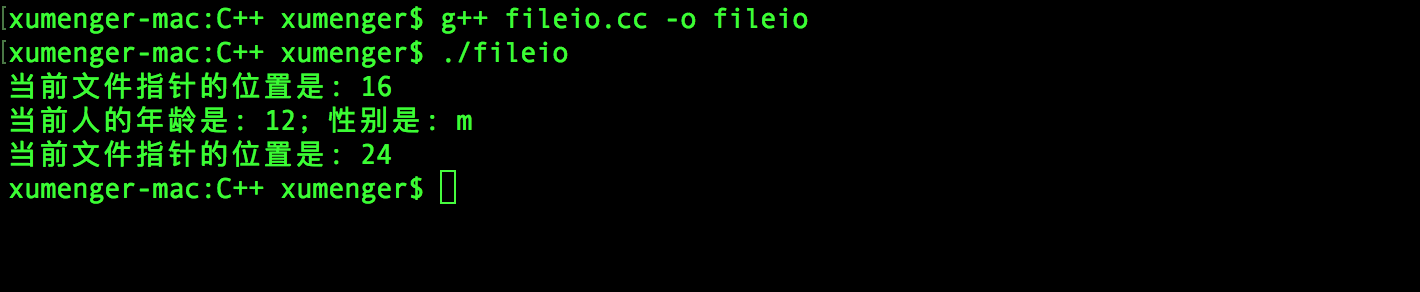
编译运行效果如下