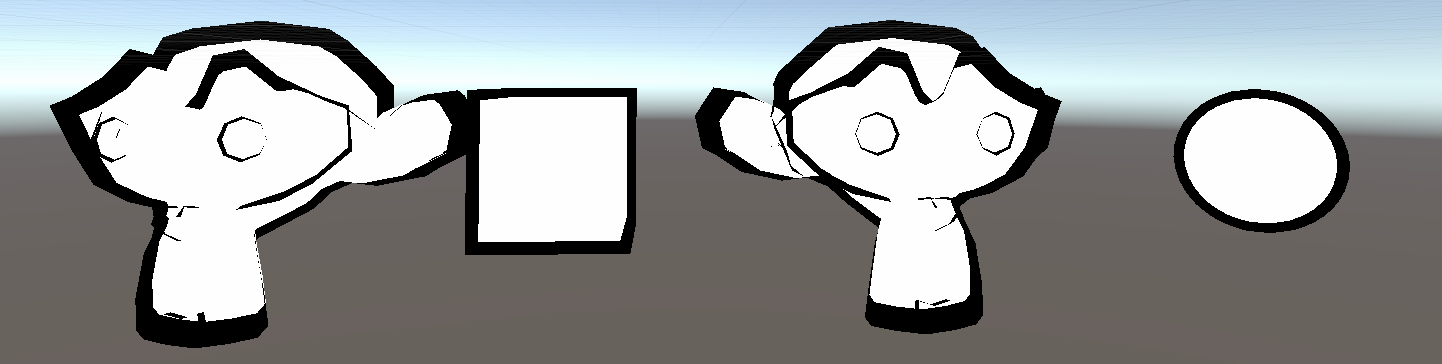
解决了上一篇中提到的Cube 模型外边框问题!
而且针对Scale 为100 的猴头,渲染效果于Scale 为100 的一致!
代码演示
Shader "Unlit/Outline_Cull_Scale"
{
    Properties
    {
        _MainTex ("Texture", 2D) = "white" {}
        _Color("Color", Color) = (1, 1, 1, 1)
        _RefValue("Stencil RefValue", Int) = 1
        _OutlineScale("Outline Scale", Range(1, 2)) = 1.05
        _OutlineColor("Outline Color", Color) = (0, 0, 0, 1)
    }
    SubShader
    {
        Tags { "RenderType"="Opaque" "RenderPipeline" = "UniversalPipeline"}

        // 渲染固定颜色(缺少光照模型、贴图处理等)
        Pass
        {
            Cull Back

            Tags { "LightMode" = "SRPDefaultUnlit" }

            CGPROGRAM

            fixed4 _Color;

            #pragma vertex vert
            #pragma fragment frag

            float4 vert (float4 v : POSITION) : SV_POSITION
            {
                return UnityObjectToClipPos(v);
            }

            float4 frag() : SV_Target
            {
                return _Color;
            }

            ENDCG
        }

        // 渲染偏大用于描边效果黑色模型
        Pass
        {
            Cull Front

            Tags { "LightMode" = "UniversalForward" }

            CGPROGRAM

            #pragma vertex vert
            #pragma fragment frag
            #include "UnityCG.cginc"

            struct a2v
            {
                float4 vertex : POSITION;
            };

            struct v2f
            {
                float4 color : COLOR;
                float4 pos : SV_POSITION;
            };

            fixed _OutlineScale;
            fixed4 _OutlineColor;

            // 缩放矩阵
			float4x4 Scale()
			{
				return float4x4(_OutlineScale, 0.0, 0.0, 0.0,
					            0.0, _OutlineScale, 0.0, 0.0,
					            0.0, 0.0, _OutlineScale, 0.0,
					            0.0, 0.0, 0.0, 1.0);
			}

            v2f vert (a2v v)
            {
                v2f o;

                // 在模型空间计算缩放,坐标和矩阵相乘
                v.vertex = mul(Scale(), v.vertex);

                //将坐标从模型空间转到裁切空间
                o.pos = UnityObjectToClipPos(v.vertex);
				o.color = float4(1, 0, 0, 1);

                return o;
            }

            float4 frag(v2f i) : SV_Target
            {
                return float4(_OutlineColor.rgb, 1);
            }

            ENDCG
        }
    }

    FallBack "Diffuse"
}